Welcome To SF Traxx.com

Welcome to the official website of veteran producer SF Traxx.
Below, you can browse the official catalog to buy West Coast rap beats and premium hip hop instrumentals online.

Showing posts with label Tutorials. Show all posts

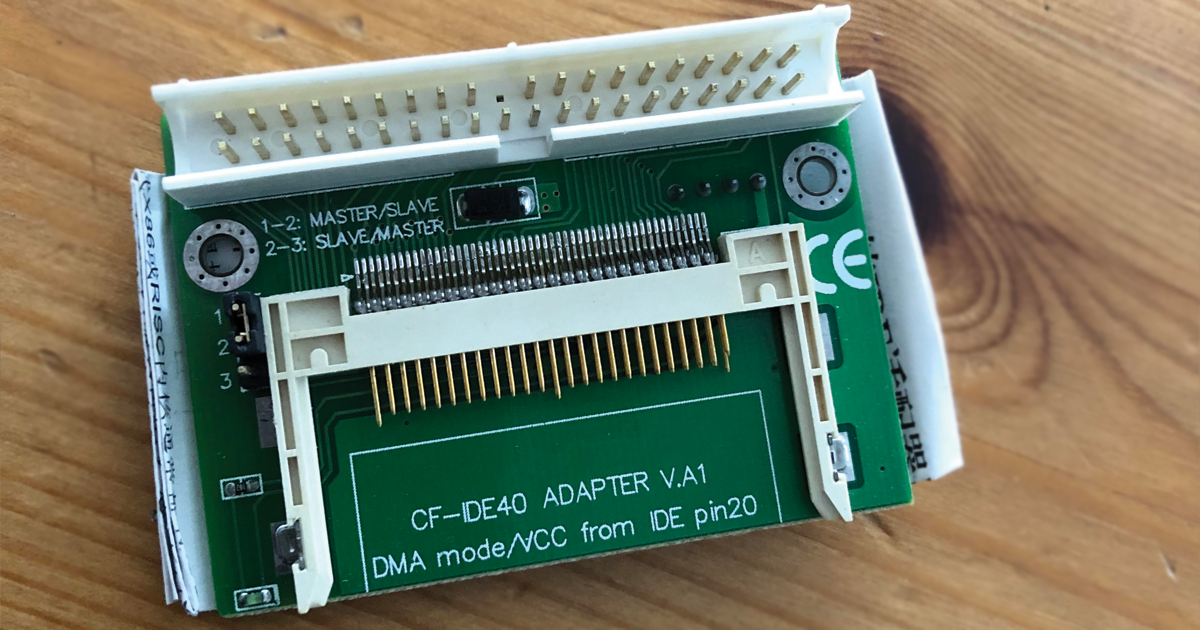
The $5 MPC 2000xl CF Card Reader

Posted On Friday, July 31, 2020

The Akai MPC 2000xl remains a legendary centerpiece in hip-hop production, but working with legacy storage formats like 3.5-inch floppy disks or unreliable internal Zip drives can completely stall your modern creative workflow. 


Upgrading your sampler to an internal flash memory card reader is the absolute best way to bring your machine up to speed, providing lightning-fast load times and seamless file management between your vintage hardware and modern computer systems.


Compact Flash to IDE adapter


Before you crack open your chassis, make sure you have the necessary parts, prerequisites, and instructions prepared. Let's break down exactly what you need and look at the step-by-step installation blueprint.


How to: Sample Your VST plugins in the MPC Live

Posted On Wednesday, November 28, 2018

The biggest superpower of the Akai MPC Live, Live 2, One, and X is their absolute standalone portability. However, leaving your studio computer behind usually means leaving your favorite, expensive desktop VST plugins behind too.


Fortunately, you don't have to choose between mobility and your favorite synth patches. Akai built a powerful, native feature into the MPC ecosystem called the Auto Sampler. This tool automatically plays, records, and maps any desktop software instrument, turning heavy VSTs into lightweight, standalone Keygroup programs you can take anywhere.


How to: set up your Akai MPK Mini MK2 pitch and mod Joystick to work in Reason

Posted On Friday, April 14, 2017

The Akai MPK Mini MK2 is widely considered one of the best compact, portable MIDI keyboards for traveling beatmakers. 


But the moment you plug it into Reason Studios, you run into a massive roadblock: the iconic red thumb-joystick defaults to a basic pitch-bend wheel, leaving your hardware modulation controls completely dead inside your virtual rack modules.


If you want to use that 4-way joystick to dynamically morph filters, adjust synthesis parameters, or sweep expression filters on the fly, you have to force Reason to manually recognize the secondary MIDI CC data streams. 


Let's break down the quick, step-by-step mapping override configuration.


The Ultimate Guide: Learn Reason's Thor Polysonic Synthesizer in 10 mins

Posted On Saturday, April 8, 2017

If you are routing patches inside Propellerhead / Reason Studios, there is one legendary sound design weapon you absolutely must master: the Thor Polysonic Synthesizer. 


With its heavy semi-modular architecture, Thor can simulate nearly any style of vintage analog or modern digital synthesis from scratch.


The truth is, looking at Thor's massive front faceplate skin can feel incredibly intimidating for beginners. To cut through the confusion, we've broken down Thor's core signal flow layout and paired it with an exceptional video walkthrough showcasing how to harness Thor's massive synthesis engines to sculpt heavy, industry-ready sub bass patches.


Powered by Blogger.
Contact

Get In Touch

sftraxx@gmail.com
TEXT ONLY: 415 570 9421
Mon - Sat (10am - 6pm)
Serious Business Inquiries only.

Contact Form

Your Name

Email

Message

© 2026 Sftraxx.com. All Rights Reserved | Privacy Policy | Terms of Service